





Safety engineers, hardware designers and reliability specialists in safety-critical industries like automotive, aerospace, medical device and industrial automation use FMEDA (Failure Modes, Effects and Diagnostic Analysis). ISO 26262 compliance for ADAS, braking systems and ECUs require FMEDA in the automotive sector. In case of a failure, the system has to respond with an approach to keep people, property and the surrounding environment safe. Siemens and Modelwise wrote a white paper on this topic as it applies to electronic systems, so I’ll share my findings.
Safety analysis reports can be written in a natural language, but then someone has to interpret them, which can introduce errors. Leaving safety analysis until after a design is done can lead to design rework and stretch out the schedule. The approach from Modelwise is to use Paitron, which formalizes and automates the functional safety process, making for an accurate and efficient way to compute FMEA and FMEDAs. Integrating Modelwise Paitron with the Siemens Hyperlynx AMS creates a methodology for the design, verification and functional safety analysis of electronic systems.
For AMS schematic capture and simulation there are tools from Siemens, Xpedition Designer and HyperLynx AMS, respectively. Designers can simulate using models from components in SPICE, VHDL-AMS or custom.
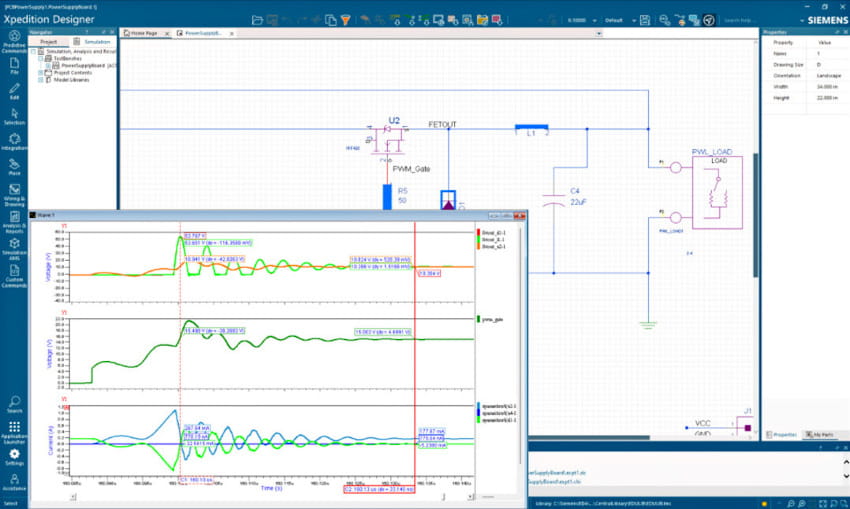
HyperLynx AMS integrates PCB design capture with circuit simulation, then Paitron enables automatic functional safety analysis.
The Part Lister in Xpedition Designer generates of bills of materials (BOMs) by extracting component property information directly from the schematic database. This enables Paitron to automatically map the components to the categories of the failure rate and modes databases, an otherwise task for engineers.
Consider an example functional safety analysis using a voltage monitor circuit where an output goes low whenever the input voltage falls outside a reference range.
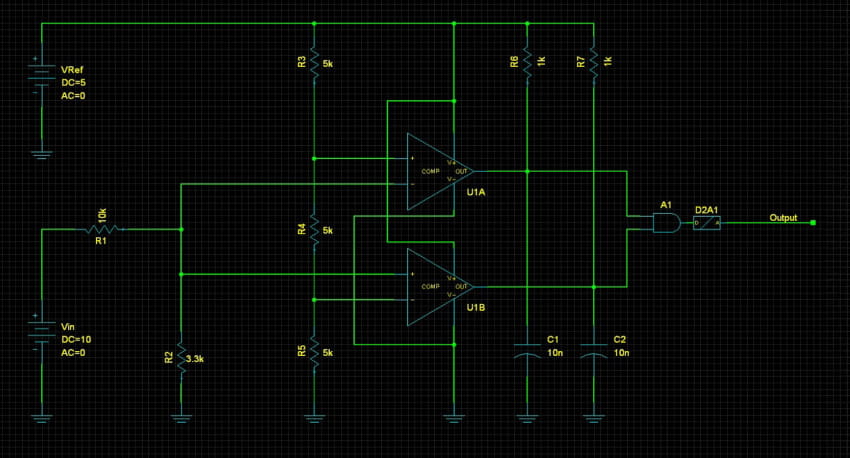
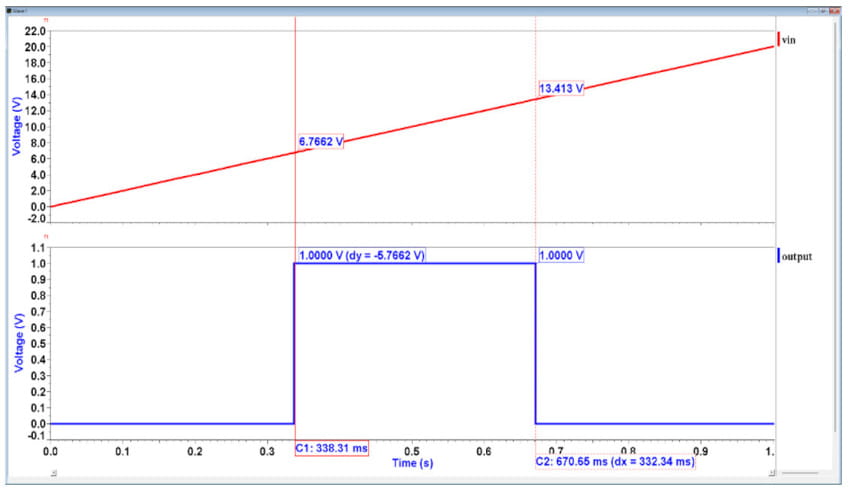
The voltage divider R3/R4/R5 determine the voltage range, so consider a failure mode where resistor R4 has an increase in resistance. This increase make the output window wider than expected, making it a safety violation.
Paitron can be used to speed up FMEA/FMEDA for this design through automation. Accuracy and standardization is achieved through template-based formalization.
In Paitron for this example the input and output variables, Vin and Vout are defined and a domain is assigned to each one.
|
Variable |
Type |
Partition |
Value |
|
Vin |
Input |
[0.1, 6.7) |
Undervoltage |
|
Vout |
Output |
(-inf, 0.5] |
Tripped |
Defined model variables and domains
System effects are next formalized using constraint expression as shown below:
|
Effect |
Description |
|
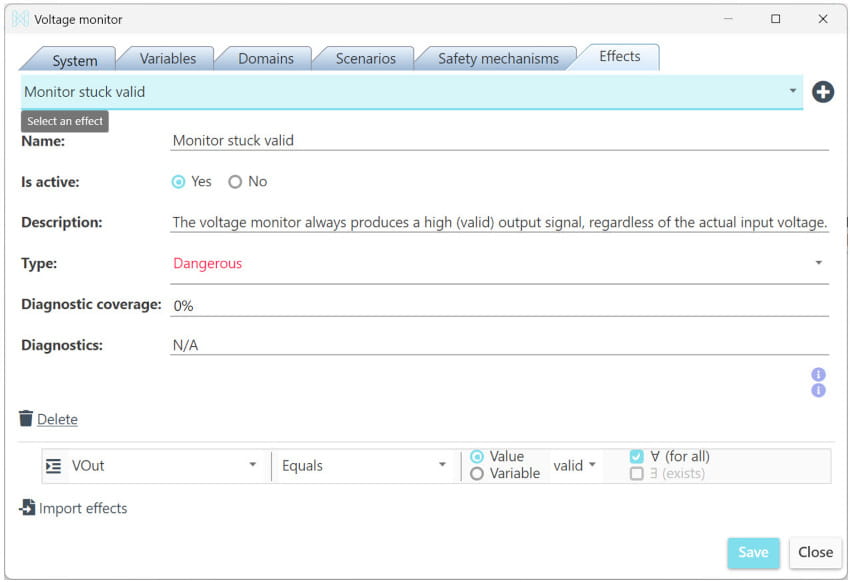
>Monitor stuck valid |
Vout is always HIGH |
|
Monitor stuck tripped |
Vout is always LOW |
|
Missing overvoltage |
Vout is HIGH for some overvolted input and LOW for others |
|
Missing undervoltage |
Vout is HIGH for some undervolted input and LOW for others |
|
Tripped valid |
Vout is LOW for some valid input voltages and HIGH for others |
In Paitron the effect for “Monitor stuck valid” is defined with the dialog:
The failure rate and failure mode distributions for each PCB component are used to compute the quantitative safety metrics. Paitron can use several sources for the failure mode and rates.
| Source name | Description |
Failure rate |
Failure mode |
| SN 29500 | Siemens standard providing failure rates for electrical and electronic components |
Yes |
No |
| IEC 61709 | Reference conditions for failure rates and stress models for conversion |
No |
Yes |
| MIL-HDBK-217F | ilitary handbook that predicts reliability of military electronic equipment and systems |
Yes |
>No |
| MIL-HDBK-338B | Military handbook that provides reliability data and analysis for electronic devices and systems |
No |
Yes |
| Birolini | Textbook by A. Birolini (Reliability Engineering: Theory and Practice, 8th Edition., Springer Berlin Heidelberg) |
Yes |
Yes |
Failure mode and rate sources available in Paitron
Failure rate and failure mode categories are assigned based on component types, shown next:
| Part(s) | Reference type | Failure rate category | Failure mode category |
| C1, C2 | Capacitor | Ceramic | LDC (COG, NPO) | Ceramic | NPO-COG |
| R1, R2, R3, R4, R5, R6, R7 | Resistor | Metal film | Metal film |
| XU1A, XU1B | Integrated Circuit | Comparator | Bipolar, BIFET | No. of transistors: ≤ 30 | Portable and non-stationary use, ground vehicle installation |
| YA1 | Integrated Circuit | Digital | Gate | AND | BICMOS | Logic | No. of gates 1-100, No. of transistors 5-500 | Portable and non-stationary use, ground vehicle installation |
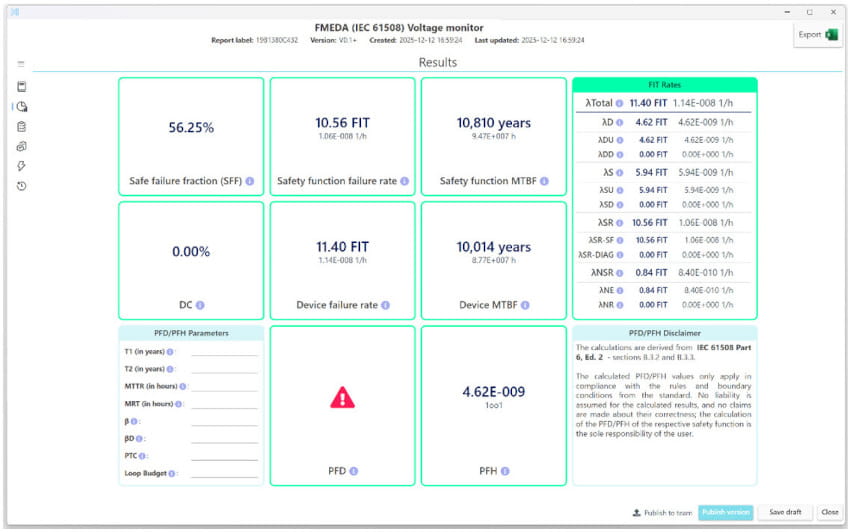
Once analysis is set up, then the automated FMEA/FMEDA is run where Paitron finds the resulting effects for each failure mode, creating a detailed safety report. Here’s the analysis summary per IEC 61508. Each component has a detailed analysis with determined effects for each failure mode, plus the distribution of the failure rates that depend on classification as dangerous/safe and diagnostic coverage.
Summary
FMEDA can be done manually or with automation, and the integration between Siemens and Modelwise provides the fastest functional safety analysis. This automation helps to cut failure rates and speed up the design cycle. Paitron and HyperLynx AMS are a proven tool combination for use on safety critical systems.
Read the 16 page White Paper online after a brief registration.
Related Blogs
- Siemens Describes its System-Level Prototyping and Planning Cockpit
- Electrical Rule Checking in PCB Tools
- Next Generation of Systems Design at Siemens
- Signal Integrity Verification Using SPICE and IBIS-AMI




Comments
There are no comments yet.
You must register or log in to view/post comments.